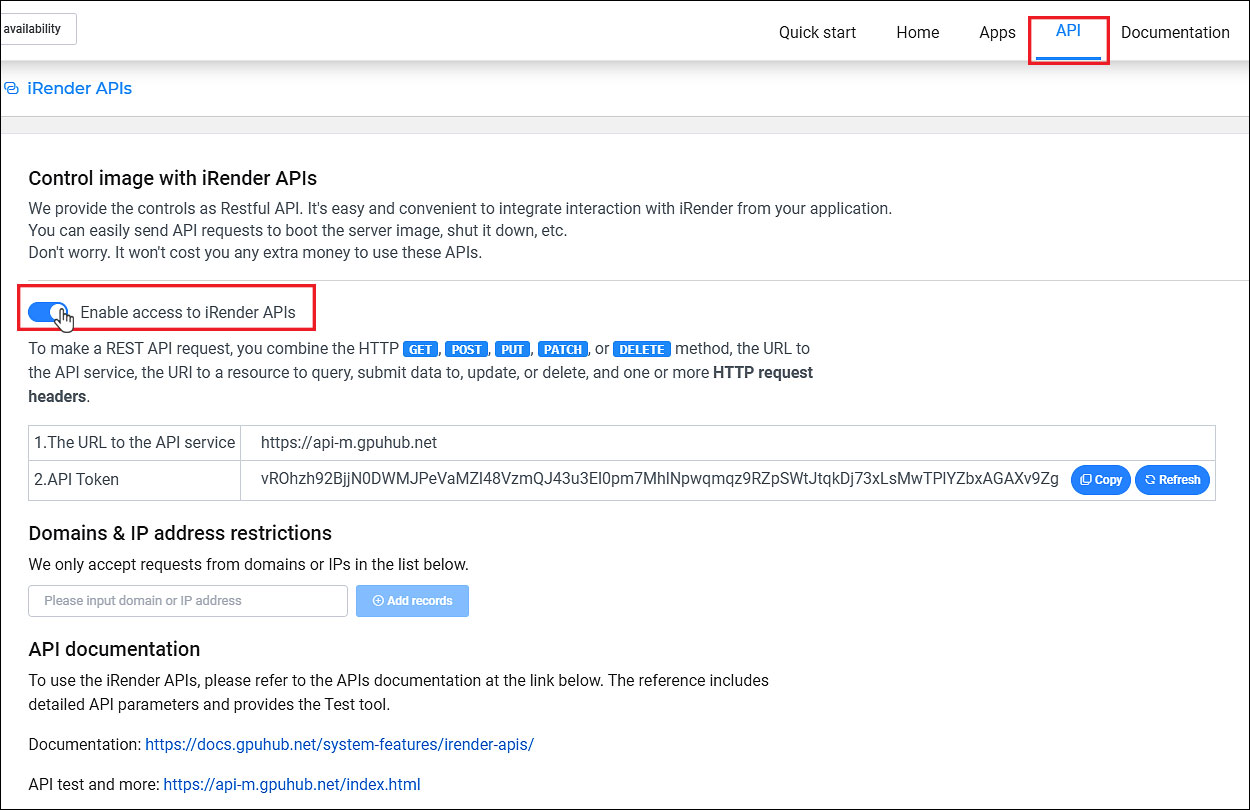
Restful API로 제어 기능을 제공합니다. 애플리케이션에서 iRender와의 상호작용을 쉽고 편리하게 통합할 수 있으며, 서버 머신 부팅, 종료 등의 API 요청을 손쉽게 전송할 수 있습니다.
걱정하지 마세요. 이 API를 사용하는 데 추가 비용은 발생하지 않습니다.
iRender API 활성화 방법
- https://app.gpuhub.net/api 로 이동하여 iRender APIs 액세스 활성화를 클릭합니다.
- 도메인 및 IP 주소 제한 추가: 이 목록에 있는 도메인 또는 IP 주소에 대한 요청만 허용됩니다.
iRender API 사용 방법: API 문서
GpuHub API 문서를 참조하세요. 이 문서에는 자세한 API 매개변수와 테스트 도구가 포함되어 있습니다.
1. API 매개변수
- apiToken: API 통합 활성화 시 제공되는 토큰입니다.
참고: API 토큰 키는 iRender APIs 페이지에서 가져옵니다. 이 키는 새로 고침 버튼을 클릭할 때까지 유효합니다.
- imageId: 특정 작업(부팅, 종료, 정보 가져오기)을 실행하는 이미지의 ID입니다.
2. API 응답
일반 (GENERAL)
| ERROR CODE | MESSAGE | DESCRIPTION |
| 62001 | API_TOKEN_INVALID | The API token is not available. Update new API token to use. |
| 62001 | API_TOKEN_INFO_FAILED | API token check failed, please try again. |
| 62002 | API_TOKEN_EXPIRED | API token has expired. Update new API token to use. |
| 62003 | REQUEST_SOURCE_BLOCKED | The API is called from an unlicensed source. Add licensed sources to the list. |
| 54001 | GET_USER_INFOMATION_FAILED | User information check failed. |
| 1050101 | GET_IMAGE_INFOMATION_FAILED | Image information check failed. |
종료 (SHUTDOWN)
| ERROR CODE | MESSAGE | DESCRIPTION |
| 1 | SUCCESS | The request to shut down the server was successful. |
| 2 | CURRENT_STATE_{STATUS} | The image status is {STATUS}, can not continue. Wait for the image to change the status. |
| 62004 | REQUEST_TOO_MANY_TIME | The request has been called too many times. |
부팅 (BOOT)
| ERROR CODE | MESSAGE | DESCRIPTION |
| 1 | SUCCESS | The request to boot the server image was successful. |
| 2 | FIXED_RENTAL_TOO_EARLY | The fixed rental period is not valid. |
| 3 | FIXED_RENTAL_EXPIRED | The fixed rental period expired, so you cannot boot the image. Cancel the request or renew the fixed rental period. |
| 4 | BALANCE_NOT_ENOUGH | Account balance is not enough to boot the image or run it. |
| 5 | TOTAL_RECHARGE_NOT_ENOUGH | The recharge amount is under the minimum. |
| 6 | MACHINE_NOT_AVAILABLE | No machines are available. |
| 7 | MAC_USED | The hardware fixation (fix MAC address) was applied for your server image. However, the hardware is currently being used. Boot the server image later or disable hardware fixation (in case of deactivating all software license keys previously). |
| 8 | MACHINE_SNAPSHOT_PROCCESSING | The image that is being created as a snapshot cannot be booted. |
| 9 | CURRENT_STATE_{STATUS} | The image status is {STATUS}, can not continue. Wait for the image to change the status. |
이미지 목록/이미지 정보 가져오기 (GET IMAGE LIST / IMAGE INFORMATION)
| ERROR CODE | MESSAGE | DESCRIPTION |
| 1 | SUCCESS | The request to get the list of images (or details of a specific image) was successful. |